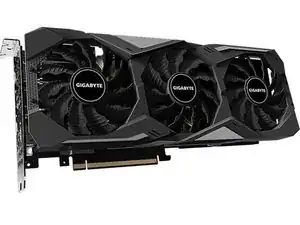
Einleitung

Führe die folgenden Schritte aus, um die 2070 Super-Grafikkarte gründlich zu reinigen und Wärmeleitpaste und Wärmeleitpads zu ersetzen.

  1. fgNiotTOIKhNDuAQ
    fgNiotTOIKhNDuAQ
    OVgY2EuZHZWtKtxg
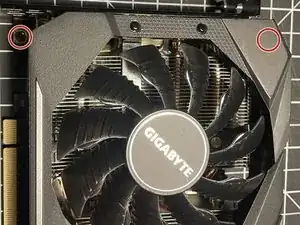
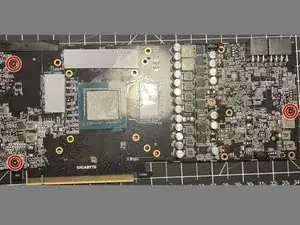
    • Benutze einen Kreuzschlitzschraubendreher PH#1, um die zwei Schrauben unter der Lüfterabdeckung zu lösen.

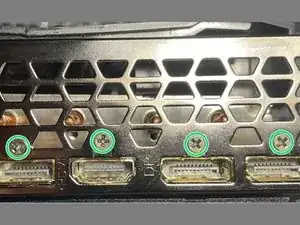
    • Drehe die Grafikkarte so um, dass du die DisplayPort-Anschlüsse siehst.

    • Benutze einen Kreuzschlitzschraubendreher PH#0, um die vier Schrauben über den Anschlüssen zu lösen.

  2. iERYDBnBx1DaSxHB
    iERYDBnBx1DaSxHB
    fKld1CKjhtYuZgCP
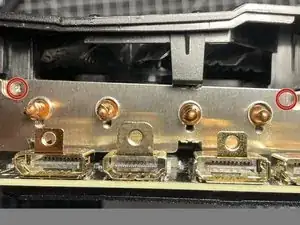
    • Benutze einen Kreuzschlitzschraubendreher PH#0, um die zwei Schrauben zu lösen, mit denen die Abdeckung befestigt ist. Drehe die Grafikkarte um 180° und wiederhole den Schritt mit den jeweiligen zwei Schrauben auf der anderen Seite.

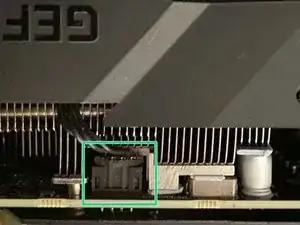
    • Trenne die zwei Lüfterkabel von der Grafikkarte.

    • Ziehe jetzt die Lüfterabdeckung vorsichtig von der restlichen Grafikkarte.

  3. xxV4jgUAt5xfPKcW
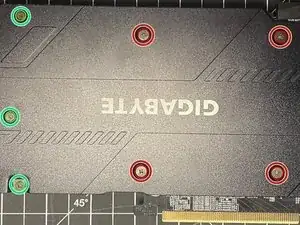
    • Drehe die Karte so um, dass du die Rückabdeckung siehst.

    • Benutze einen Kreuzschlitzschraubendreher PH#0, um die vier Schrauben zu lösen, die eine Feder haben.

    • Benutze den gleichen Schraubendreher, um die restlichen drei Schrauben zu lösen.

    • Drehe die Karte wieder in die Ausgangsposition um und entferne vorsichtig den Kühlkörper von der Karte.

    The backplate and heatsink were stuck on super hard, very difficult to separate. My tips are: use a hair dryer to soften up the thermal pads and grease, and pry at the extreme end of the backplate/heatsink instead of in the middle.

    fezzo -

  4. ebICRlEav1Jetiql
    • Benutze den Kreuzschlitzschraubendreher PH#0, um die drei markierten Schrauben zu lösen.

    • Entferne vorsichtig die Rückabdeckung.

  5. RIDiYsDPBZgmQNlj
    RIDiYsDPBZgmQNlj
    dqhSXWGbWQKwESdN
    • Hierfür brauchst du besondere Materialien: Isopropanol (90% oder höher).

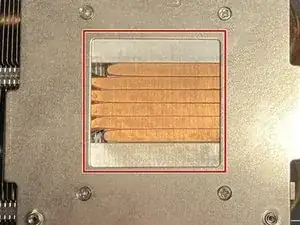
    • Benutze das Isopropanol und Wattestäbchen- oder Pads, um die Wärmeleitpaste vorsichtig von dem Kühlkörper zu entfernen.

    • Wiederhole den Schritt mit der CPU.

    • Überprüfe, ob du alles entfernt hast, bevor du fortfährst.

    You can unscrew the plate from the heat sink to get easier access to remove the thermal paste and do deeper cleaning.

    fezzo -

  6. EUemvXn6sJFAooMK
    • Benutze eine hochwertige Wärmeleitpaste wie z.B. die Arctic Silver von iFixit.

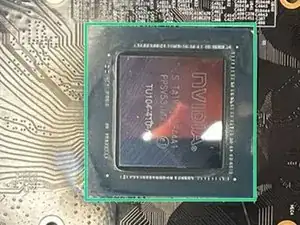
    • Trage eine geringe Menge der Wärmeleitpaste auf die CPU auf.

    • Benutze eine dünne Platte wie z.B. eine alte Bankkarte, um die Wärmeleitpaste über die komplette CPU zu verteilen. Achte darauf, dass keine Paste über die Kante hinaus quillt.

    • Wenn du die Wärmeleitpaste in warmem Wasser erwärmst, lässt sie sich meistens leichter verteilen.

  7. awXearF2DtHQNvG5
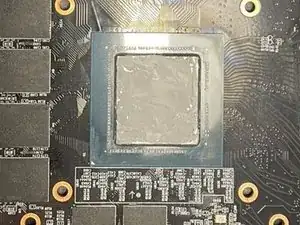
    • Entferne die VRAM-Wärmeleitpads. Oft kannst du sie einfach abziehen.

    • Reinige die Stellen, an der die Wärmeleitpads waren mit Isopropanol.

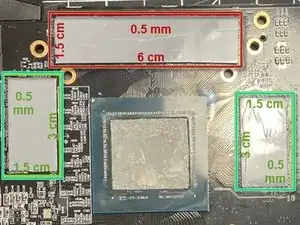
    • Du brauchst Wärmeleitpads mit diesen Maßen: 0,5mm x 60mm x 15mm sowie 0,5mm x 30mm x 15mm (Höhe x Länge x Breite).

    • Platziere das längere Wärmeleitpad auf die VRAM-Chips oberhalb des Prozessors.

    • Platziere die anderen beiden Wärmeleitpads parallel zueinander auf die restlichen VRAM-Chips neben dem Prozessor.

  8. CGfLSG52QxjJLXjL
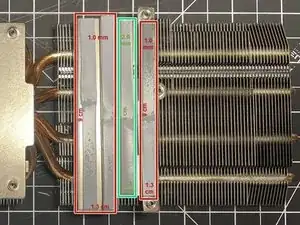
    • Entferne die alten Wärmeleitpads und reinige den Kühlkörper mit Isopropylalkohol.

    • Nimm drei Streifen der 1,0 mm Wärmeleitpads in den Maßen 9 x 1,3 cm und befestige sie wie rot markiert am Kühlkörper.

    • Nimm einen Streifen der 2,0 mm Wärmeleitpads in den Maßen 9 x 1,3 cm und befestige ihn wie grün markiert am Kühlkörper.

    The measurements here are wrong, each strip is not 1.3cm wide - more like 7mm wide.

    I also found a 1.5mm thermal pad is a better fit than a 2mm thermal pad (for the third strip in this picture).

    fezzo -

    What makes you think it's a better fit, what are you fitting it against to confirm?

    Andy -

    I opened for the first time my card and the first stripe (the left most one) is completely missing leaving the capacitors there naked.

    I checked that there isn't any loose pad elsewhere that might came off from there.

    How normal is this?

    padrobo -

  9. GHWIicDcAMWNHi2X
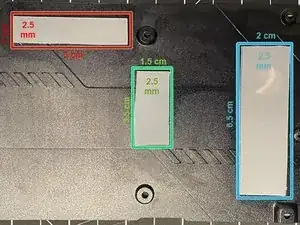
    • Entferne die alten Wärmeleitpads und reinige die Rückplatte mit Isopropylalkohol.

    • Nimm einen Streifen der 2,5 mm Wärmeleitpads in den Maßen 5 x 1 cm und bringe ihn wie rot markiert an der Rückplatte an.

    • Nimm einen Streifen der 2,5 mm Wärmeleitpads in den Maßen 3,5 x 1,5 cm und bringe ihn wie grün markiert an der Rückplatte an.

    • Nimm einen Streifen der 2,5 mm Wärmeleitpads in den Maßen 6,5 x 1,5 cm und bringe ihn wie blau markiert an der Rückplatte an.

    You can get away with using 3mm thermal pads here too, more contact between the PCB and backplate.

    fezzo -

    • Wenn die Videokarte gereinigt und alle Wärmeleitpads angebracht sind, dann folge den Schritten in umgekehrter Reihenfolge.

Abschluss

Führe die folgenden Schritte aus, um die 2070 Super-Grafikkarte gründlich zu reinigen und Wärmeleitpaste und Wärmeleitpads zu ersetzen.

Caleb Ellenburg

Mitglied seit: 27/11/23

235 Reputation

13 Kommentare

Thank you so much. It was exactly what I was looking for.

Ahmet Bozacı -

steps 1 and 2 (fan shroud/display port shield) are unnecessary. The entire fan + heatsink assembly comes off in one piece and the DP shield stays attached to the board. Also on step 8, all of the pads are 1mm. The green one was not 2mm on mine. (measured with caliper, they are all identical)

Not Me -

On step 8, 9x1.3cm wasn't too wide? It looks more like 9x0.8cm.

Albert -

A couple of questions:

1. Is it ok to use 3mm pads instead of 2.5mm in the back plate?

2. On step 8, 9x1.3cm is way to big, it looks more like 9x0.8cm. Also can i use 1.5mm instead of the 2mm?

Albert -

Did you do it? What thickness did you use for the backplate?

Feixas -

Mine were already 3mm on the back. I wouldn't use a thinner pad than was already installed in case it no longer makes good contact, but I reckon you could get away with 0.5mm thicker on most of them without issue because they squash flat pretty well, almost like clay. (At least these Thermal Grizzly minus pads do)

Phatt Johnson -

***HOLY $@$****

I only replaced the paste and saw a 30 degree dip on my gpu hotspot using HWMonitor.

It went from 104 to 77.4. It normally reached this temp in about a min.

and my GPU temp never went above 69.5.

This is a pc upgrade that only requires isopropyl-alcohol, Qtips and thermalpaste

i used arctic silver Mx4

100/100 would reccomend.

Scott Timmermans -

On step 8, i juste do it, left to the right

1st: 9x0,8. 1mm

2nd; 9x0,5 cm. 1mm

3rd; 9x0,5 or 0,6 cm. 2mm

4th; 9x0,5. x1

Emilien Foulon -

It looks like they have different sizes even with same models...

In case someone needs the one i measured for my Gigabyte RTX 2070 Super Gaming OC 3X (GV-N207SGAMING OC-8GD):

- 2.5mm under the backplate (65x20mm, 35x20mm, 50x15mm)

- 0.5mm RAM (30x15mm, 30x15mm, 60x15mm)

- 1mm VRMs (90x6mm),

- 1mm chokes (90x10mm)

- 2mm capacitors (85x7mm)

I followed another Youtube tutorial and ordered the wrong pads for capacitors (1.5mm were too thin). I just stacked 1.5mm and 0.5mm since caps don't get too hot anyways.

I've used "1pc 12.8W/MK Thermal Pad Non-Conductive GPU Card Water Cooling Thermal Mat For CPU CPU PS4 SSD Thermal Pad Silicone Grease Pad" from "3CCC Store" on Aliexpress. The packaging says "7 SUBZERO SEVEN THERMAL PAD STORM 15W/mk". They aren't as soft as the stock pads, but they seem to be okay.

Denny -

The temperature went from 85C to 60 max. Plus I am getting more fps now, on heavens benchmark for example 60fps -> 79fps.

Gyunay Kadirov -

In step 8 i used 1.5 mm pad instead of 2 mm is it okay? And also i don't have the right most thermal pad strip? How??

Red -

I don't have the left most one.

Don't know what to say...

padrobo -

Just did this in 2025!

I needed to use:

- 0.5mm pads around the die

- 1.5mm pads for 3 of long thin VRM pads, 0.5mm for the fourth one

- 3mm pads on the back.

On an Australian model Gigabyte Gaming OC, my copper pipes above the die itself look different to the pics so seems not every heatsink is identical.

The pads on the back were still perfect 6 years in despite other overheating issues, so it seems you won't need to replace those unless you damage them taking the cover off somehow (they're thick, so good luck).

And yes, steps 1 and 2 can be skipped entirely (other than removing the 2x fan cable plugs).

Phatt Johnson -