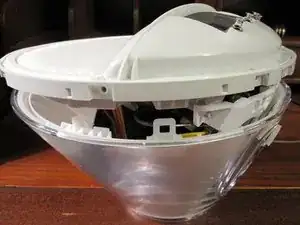
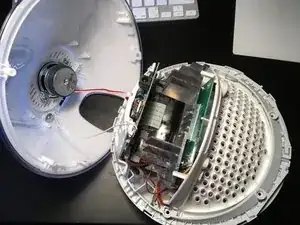
Einleitung

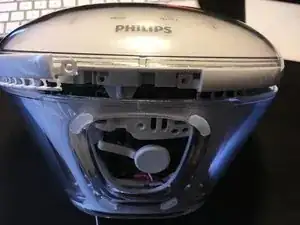
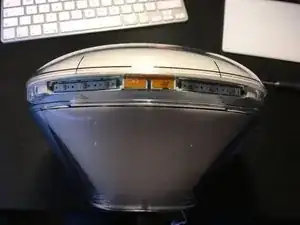
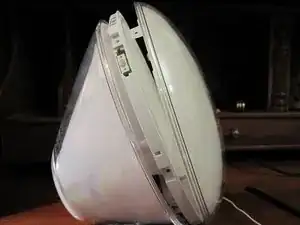
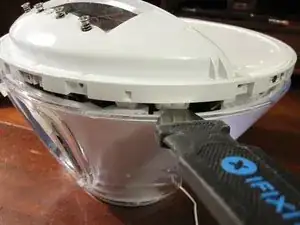
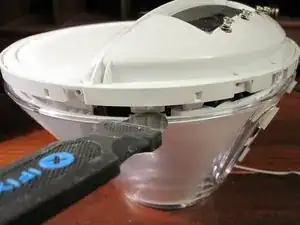
Diese Nachttischlampe ist ein bisschen schwierig zu öffnen, aber mit dem richtigen Werkzeug gelingt es. Ein Werkzeug mit einer stumpfen dünnen klinge, z.B. iFixits Jimmy erleichtert das Öffnen sehr.

Die Anleitung gilt für einige ähnliche Modelle: HF3520, HF3560, HF3531, HF3501 und HF3510.

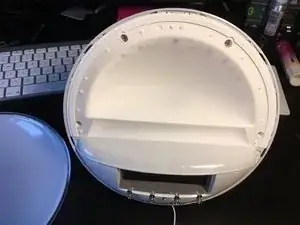
Zweck hierfür war einen Antennenanschluss (BNC) zu installieren um eine Teleskopantenne oder Dachantenne anzuschließen. Die Anleitung ist aber auch nützlich für Reparaturen an der Hauptplatine.

  1. oXGvr3XZ1KCaQl6Z
    oXGvr3XZ1KCaQl6Z
    L5sD2eK35po6nESy
    fJ1QlW51XY4xKyIo
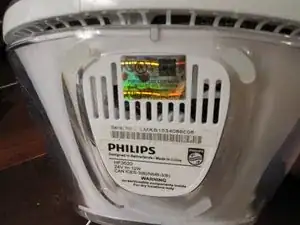
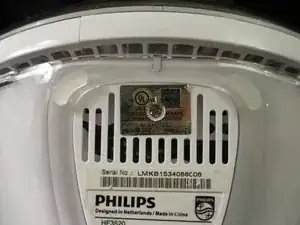
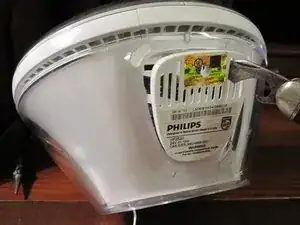
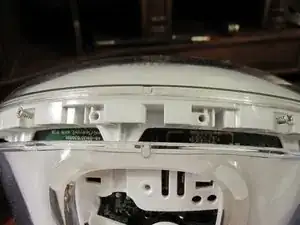
    • Unter dem glänzenden UL-Aufkleber befindet sich eine Schraube. Entferne den Aufkleber oder schneide ihn ein und entferne die Schraube, um diese Bodenplatte abzulösen.

    • Es gibt zwei Laschen, die das Panel auf der Rückseite der Uhr/des Lichts halten. Wenn es nicht leicht abgeht, musst du mit einem Spudger oder einem Flachschraubendreher am Panel nahe bei der Schraube nach vorne und außen wackeln.

    There is one screw under this tab that's hold the front ring attached in fact. I guess you should have removed it too before prying this ring open

    Luuk Akkerman -

    That one does not hold the ring but the cover (step 4).

    Wozu das denn -

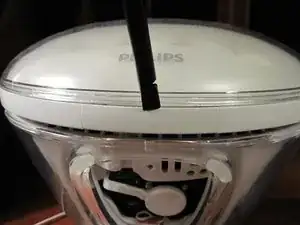
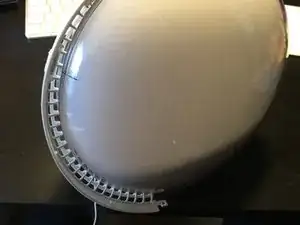
  2. Lege die lamtauf Rückseite, dann wird ein kleiner Abschnitt der Blende sichtbar, der nach oben gehebelt werden kann. Es ist ein kleiner Plastikstreifen mit Haken, die gelöst werden müssen, um sie zu entfernen.
    • Lege die lamtauf Rückseite, dann wird ein kleiner Abschnitt der Blende sichtbar, der nach oben gehebelt werden kann. Es ist ein kleiner Plastikstreifen mit Haken, die gelöst werden müssen, um sie zu entfernen.

    • Schiebe die Klinge eines Jimmys direkt in die Spalte über der Abdeckung. Wenn sie sich einige Millimeter geöffnet hat, kippe sie und hebe sie leicht an.

    • Schiebe den Jimmy nach rechts und drücke ihn gegen den Riegel, bis er sich löst. Wiederhole auf der linken Seite.

    • Du kannst einen Jimmy verwenden oder ein anderes Werkzeug mit dünner stumpfer Klinge.

    • Hinweis: Im Video wird mit einem Spudger gearbeitet, aber das funktioniert hier nicht sehr gut, er braucht zu viel Kraft, um ihn einzusetzen.

    Getting this section off/out without damaging it is nearly impossible. It’s hooked under the rear rim and it is held down by three clips. I ended up cutting the little bows that connect it to the back and then used pliers on one side to, well, basically break it out…

    Adjel van der Meer -

    This stage was tricky but by poking a small flat-head screwdriver in alongside the tabs shown in the photo and twisting, I was able to remove it in one piece. Careful studying of of the image above shows where you need to go. Thanks for this excellent guide, I would never have figured this out without it.

    Nick Page -

    Use a plastic tool or a something like a credit card to get that part out: it won’t break it and it is actually quite easy to remove (same tool used for smartphone)

    laurent reichsrath -

    Wow, this would have been impossible to do without seeing the pic of the part! I managed to get it free using a tiny flat-head screwdriver to the clip (all three, one by one) and a larger one pushing up on the rim simultaneously.

    Tamar Opher -

    Thanks also from my side, it would have been an impossible mission without your guide and excellent illustrations. I also succeeded to remove the plastic strip lock with a tiny flat-head screwdriver and a pair of good steel pliers. No damage.

    Cesare Liguori -

    My model had a screw instead of the clips and was easy to remove. I did use a plastic pryer and think that helped.

    Mark van der Staay -

  3. XaM1nQQPGKbySGOm
    XaM1nQQPGKbySGOm
    PTyGmD1HUVmGOYRb
    YnTmOye3gMlAwAfO
    • Wir können endlich zwei weitere Kreuzschlitzschrauben lösen, um den Knopfring zu entfernen.

    • Tipp: Hebe den Ring an einem Ende hoch, wobei du ihn zur Rückseite des Weckers hin kippst. Dadurch lösen sich die Haken unter der rückseitigen Rille und du kannst ihn weiter ablösen.

    Lift one end of the ring, tilting it toward the back of the alarm clock. That will get the bows out from under the rear rim so you can start removing it..

    Adjel van der Meer -

  4. pF5ALKLDRRQRBLbo
    pF5ALKLDRRQRBLbo
    LWSRC5dKcn5HSohD
    • Nun müssen die sechs Schrauben entfernt werden, die die vordere Abdeckung festhalten. Dann kann die vordere Abdeckung nach vorne abgezogen werden.

    • Achte darauf, dass die innere Streuscheibe nicht beschädigt wird.

  5. fVLJtxg5YPUW2sIJ
    • Entferne die vier Schrauben, mit denen die innere Streuscheibe befestigt ist.

    • Diese Schrauben haben eine Spitze.

  6. reKOWyiWwQTrV4S6
    reKOWyiWwQTrV4S6
    UHS2HDiKyLFk1H12
    TVR6rRYGbPDgELcT
    • Die innere Lichteinheit wird von zwei Laschen unten links und an der rechten Seite gehalten.

    • Nimm ein Metallwerkzeug mit dünner stumpfer Klinge, z.B. einen Jimmy und drücke die hintere Lasche nach innen, bis sie sich löst.

    • Hinweis: wahrscheinlich musst du recht kräftig drücken.

    • Hinweis: wenn du die innere Lichteinheit leicht herausziehst, siehst du die Laschen besser. Wenn du sie zu weit herausziehst, entsteht allerdings ein Druck auf die Laschen und sie sind schwerer zu lösen.

    Need to push quite hard on the tabs, don’t be surprised

    totosolat -

    Thank you for your comment. I was about to give up, then I read your comment and tried again pushing a little harder and it worked just fine!

    Ifelix -

    It almost seems like screws are holding it in - but man - the other commenters are right - you realllllly gotta push those tabs in to get it to release. At some point, I was like, "well, if I don't get it open, it's broken anyway, so push really really hard." Worked.

    cio -

    Wooaw, that was scary but I did it. It really seems that there are additional screws to remove near the tabs, but really it's not the case. There ARE screws, but they don't need to be removed (and they face inwards anyway so they couldn't be removed).

    Félix Chénier -

  7. sakGCIUNY1uPGfB2
    sakGCIUNY1uPGfB2
    Ifg15OyFZYXWIdbK
    • Trenne den Lautsprecher von der Hauptplatine ab.

    • An der Platine ist eine Antenne (ein weißer Draht) festgelötet. Die Lötstelle ist sehr empfindlich. Ziehe nicht am Draht.

    • Löse die Schraube und die Unterlegscheibe auf der Rückseite beim Lautsprecher und hole den Antennendraht darunter heraus. Ziehe die Antenne ganz durch, so dass die Rückseite entfernt werden kann.

    • Du kannst auch einfach den Draht soweit herausziehen, dass kein Zug mehr auf der Lötstelle ist.

    • Beachte, dass die Stecker des Lautsprechers und des Summers gleichartig sind, verwechsle sie nicht beim Zusammenbau.

Max

Mitglied seit: 13/11/12

1351 Reputation

14 Kommentare

Awesome teardown except for one little thing…

The factory sticker shows this is a 3530 which may not be different from a 3520. However, the bottom plate screw MUST be removed in order to separate the two halves. It is a little confusing saying “The bottom panel does not help gaining access to more screws. See next step.” I took that as being unnecessary, so skip.

Takkens Shoes -

I was able to fix my speaker inside it i got this alarm at a thrift store for cheap turns out the one wire just needed a better conenction to get working thank you for the steps to get to it

johnstone1889 -

The first photo of step 5 is a little misleading, it looks like you are unscrewing something, it made me look for the screws

Other than that this was very helpful, thank you

paulamicel -

Thanks so much for this guide! The speaker in my H3510 had suddenly stopped working. I managed to take it apart with this guide. It turned out one of the wires on the speaker had come loose. We soldered it back on and that fixed it!

heleen -

Thx!. Now I am able to fix the power cord which was often unplugged. So i soldered the power cable fixed to the pcb.

pibi -

3520 is very similar with the first steps identical. Many thanks for this guide!

I needed to get to the little switches because they are apparently the reason for a malfunction syndrome consisting of clicking noise and disabled menu sensors (according to a post which I have now lost the track of - my apologies). I gave the switches a gentle squirt of the well known panaceum known as WD40 which they sucked in greedily, following which I exercised them a little until the click sound became clear. Reassembling was a doddle. Now I am waiting for the WD40 to (mostly) evaporate while keeping my fingers crossed (this is a good procedure and a form of exercise). Then I shall switch the light on and we shall see how successful I was. Thanks again!

Wlodek Tych -

Anyone able to fix this alarm/light not powering up at all? Wondering if there’s a fuse or just developed a loose connection for the ac cable.

ark frid -

Yesterday my lamp was making a clicking sound and front LED was blinking with the sound. Now LED is not displayed and it looks like it's not powering up.

Any advice?

Nilesh Patel -

I have the same problem. It has been working fine for years, and then the whole lamp stopped working, lamp and LED display.. No repons what so ever. Any advice?

Alx -

Quick fix: if your alarm starts behaving oddly (switched light off when alarm time reached), it could be the speaker problem. To replace steps above help reached the speaker. But there is also an option just to disconnect it, then first step is sufficient.

professor -

Ha! I see I wasn't the only one experiencing "has been working fine for years, and then the whole lamp stopped working, lamp and LED display.. No re[s]pons[e] what so ever". I was able to open it thanks to this guide (whoever designed the insides of the lamp at Philips must be some sort of BDSM lover!) but I couldn't find any fuse. I left it open for a couple of weeks while I've been out of the country and I tried to power it again (still disassembled) to see if I can just throw it out. And what do you know, it just worked! I took advantage that it was disassembled and I included a very small mod - an "audio out" connector - to be used for a future Home Assistant automation project. And then I put it back together, which was a success, considering that it looks the same as before, it works perfectly, it has the additional "audio out" connector AND I also was left with 2 screws! :)) I remember one of them was holding down the small antenna wire but the other one I still can't figure where it used to go

Philips Maze -

Thanks for showing how to disassemble. You helped me fix my unit :-).

Mine was acting up and maybe this can help others?:

It brightened the light when the alarm time was closed as it is supposed to, but when the alarm time was reached it turned off the light and locked up the buttons. Power had to be recycled to bring it back.

Turned out it was a bad 2200uF, 6.3v capacitor on the second PCB (the PCB connected with a flat ribbon cable to the PCB with the power connector. The PCB nearest the back cover is the one with the power connector)).

It is a capacitor located to the right on the PCB when you look at the component side. It is just next to the heat sink, so probably a bad location for a capacitor.

Desoldered the Capacitor measures "between" 27pF and "damaged component" in my component tester. A new capacitor seems to have solved the issue.

Gert Lynge -

Thanks, your guide apply also for the HF3520. Mine won't power up anymore due to the defective MXT2410SX replaced thanks to another guide.

CHEERS !

Broffrey -

Mine had started to reset the clock time whenever the alarm time was reached (without sounding the alarm) - a quite useless feature unless you want to know how many hours ago you were supposed to wake up... Then at some point it couldn't be powered on anymore and I could hear something rattling inside when i turned it upside down. Thanks to your guide I was able to disassemble it and found a loose capacitator cover inside.

Lai -