Einleitung
Dieses Verfahren zeigt, wie man einen Neustart bei einem iPhone 12 erzwingt.
-
-
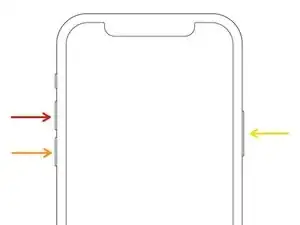
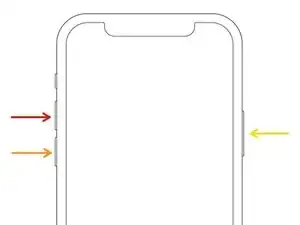
Drücke schnell auf die Volume + Taste und lasse sie sofort wieder los.
-
Drücke schnell auf die Volume - Taste und lasse sie sofort wieder los.
-
Drücke auf die Einschalttaste und halte sie gedrückt.
-
Lasse die Einschalttaste los, sobald das Apple Logo erscheint.
-
Abschluss
Fertig.

5 Kommentare
So helpful, appreciated it. It worked, thank you.
Literally saved me a trip to the Apple Store. Thank You!
My iPhone 12 Pro ear speaker is no working pls help me
Nilam -
すみませんが 画面が動きませんでした
末次千恵子 -
詳しい原因はわかりませんが、ボタンの順番を早く押さないと動作しないかもしれないそうです。また、音量アップと音量ダウンを押したままにせず、電源を長押しする前に素早くタップだけしてみてください。
Midori Doi -
Very helpful. Following these steps, I was able to force start my Apple 14 Pro max easily.
pramod Kumar misra -
WICHTIG: diese Tastendruck Anweisung in weniger als 1 (einer) Sekunde machen !
Viele andere Inernetseiten schreiben dies nicht so präzise.
Diese Seite ist präzise und hat mir top mit meinem iPhone 11 geholfen.
Thomas Reuter -
What if this didn’t work? My phone won’t turn on.
Gwen Shilling -
Mil gracias, sirvió a la primera y ya prendió
Juan Pablo Diosdado Hernandez -
Thank You! very helpful!
Rolando “Dr J” Villaraza -
Apple 12 pro nimesahau icloud
Bonchule -