Equirectangular projection/SPH2EQUI


Introduction
The learning unit addresses the following steps of equirectangular conversion and extracting a Planar View from an Equirectangular Image:
- explanation of the mathematical concept
- coding example in Javascript and projection from one HTML canvas to another canvas application of equirectangular projection to the planar image projection e.g. for the 360 degree panorama viewer e.g. used in Open Source frameworks for 360 spherical panoramas.
Conceptual Background
- Equirectangular projection: A 2‑D map where the horizontal axis is longitude (‑180° → +180°) and the vertical axis is latitude (‑90° → +90°). Every degree of latitude and longitude occupies the same number of pixels → rectangular grid.
- Spherical coordinates: Position on a sphere described by radius , polar angle (colatitude, measured from the north pole) and azimuth (longitude).
- Perspective (planar) view What a pinhole camera would see when looking from a point on the sphere’s surface toward its interior, with a given field‑of‑view (FOV).
- Field‑of‑view (FOV) Angular width of the view, usually expressed in degrees (e.g., 90°).
- Radius of the sphere determines the size of the equirectangular image with an aspect ratio 2:1 (in general). Equirectangular viewer (see equirectangular projection) can accept other rectangular formats as well because the will interpret the sizes with a scaled 2:1 aspect ratio for the longitude and latitude of the panorama sphere.


Application Scenario
Equirectangular images can be created with specific cameras with one shot or with multiple images e.g. Hugin from a centre of view in multiple directions and coving with the images all directions.
Mathematics – From View Parameters to Source Pixels
Input Parameters
| Symbol | Meaning | Typical Range |
|---|---|---|
lon
|
Longitude of the view centre, will refer to the vertical -coordinate the centre pixel of the output image | |
lat
|
Latitude of the view centre, will refer to the vertical -coordinate of centre pixel of the output image | |
| Radius of the virtual sphere (any positive number ). At the equator of the sphere there is no distortion of the length and therefore the length of the equator is and the width of the equirectangular image can be calculated with the radius | ||
HFOV
|
Horizontal Field‑Of‑View (HFOV) camera property of the output image (degrees) | |
VFOV
|
Vertical Field‑Of‑View (VFOV) camera property of the output image (degrees) | |
W_out, H_out Width , Height
|
Width & height of the output image usually defined by the display sizes, the output will be produced for. | width:height = 9:6 |
equirectImg width, height
|
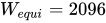
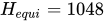
Source equirectangular image (width , height ) in general the ratio between . The ratio is reasonable, because the range for has a span of degrees and the range of is . | Example for width and . For high resolution equirectangular images created from several camera images with Hugin sizes with can be produced. |















Convert centre direction to a unit vector
The unit vector defines the fraction of the width and height of the equirectangular image. Latitude lat and longitude lon are converted into a unit vector for the x and y coordinates.
![{\displaystyle u_{out}=(u_{x},u_{y})\in [0,1]\times [0,1]}](../_assets_/eb734a37dd21ce173a46342d1cc64c92/6d95ae1a52e415701d40e99f1e9cc9a759518f6d.svg)
Remark - Unit Vector
The usage of a unit vector in allow easy coordinate calculation even if the equirectangular image does not have the aspect ratio 2:1.
![{\displaystyle (u_{x},u_{y})\in [0,1]\times [0,1]\subset \mathbb {R} ^{2}}](../_assets_/eb734a37dd21ce173a46342d1cc64c92/447e6c79f9efdbb92b3919e1c820798adf932d00.svg)
Unit Vector and Length
In Linear Algebra the unit vector have the length 1. In this context of an equirectangular image the unit vector refers to the width and height of the equirectangular image as a unit and is the fraction of width as unit and is the fraction of the height as unit.


Calculation of the Unit Vector
The following code example in Javascript is showing the transformation of angles Longitude and Latitude (lon, lat) into the desired unit vector. This will be transfered into a method getUnitVec(lon,lat) of a Javascript class.
var u_x = (lon+180) * Math.pi/360;
//  c_x ranges from 0 to 1
var u_y = (-lat + 90) * Math.pi/180;
//  0 at north pole (+90) and 1 is south pole (-90)
With the unit vector the correponding coordinates of the equirectangular image can be easily calculated by stretching the unit vector with the width resp. height of the equirectangular image.

var x = Math.floor(equi.width * u_x);          //  x ranges from 0 to width of the equirectangular image
var y = Math.floor(equi.height * u_y);
Learning Task
Create /extend a Javascript class Equirectangular that
- sets the equirectangular width with the method
setEquiWidth(pWidth)that sets the width and height with the ratiowidth:height = 2:1. Take care that the width and height are integer values and not decimal number by usingMath.roundand
setEquiWidth(pWidth) {
  var height = Math.round(pWidth/2);
  var width = height * 2;
  this.equirect = {
    "width":width,
    "height":height
  };
}
- sets the equirectangular height with the method
setEquiHeight(pHeight)that sets the width and height with the ratiowidth:height = 2:1.
setEquiHeight(pHeight) {
  var height = Math.round(pHeight/2);
  this.equirect = {
    "width": 2*height,
    "height":height
  };
}
- is able convert the angles into equirectangular image coordinates with the method
sph2equi(lon,lat) - get unit vector for the equirectangular image with:
![{\displaystyle (u_{x},u_{y})\in [0,1]\times [0,1]}](../_assets_/eb734a37dd21ce173a46342d1cc64c92/3828cd410b7ad8e941a5cf67c6ec587f4c72e854.svg)
getUnitVec(lon,lat) {
  //  u.x ranges from 0 to 1
  //  u.y=0 at north pole (+90)
  //  u.y=1 is south pole (-90)
  return {
    "x": (lon+180) * Math.pi/360,
    "y": (-lat + 90) * Math.pi/180
  }
- get rectangular coordinates for the equirectangular image with:
![{\displaystyle (x_{equi},y_{equi})\in [0,W_{equi}]\times [0,H_{equi}]}](../_assets_/eb734a37dd21ce173a46342d1cc64c92/c6a7fc86b3eb1d2abfe8e0bd2b3a90d33dffba37.svg)
getEquiCoordinates(lon,lat) {
  var u = this.getUnitVec(lon,lat);
  return {
    "x": Math.floor(u.x * this.equi.width),
    "y": Math.floor(u.y * this.equi.height)
  };
}
Implementation in Python
If you prefer to implement an equirectangular image processor in python as a learning task transfer the mathematical approach to a Python class.